By Derek Mutiso
Practical Cybersecurity for SMEs in Kenya
Cybersecurity should be a genuine concern for any SME operating in Kenya today. It’s clear to anyone who follows the headlines that there has been a notable rise in successful cyberattacks in the country over the past few months – the most recent one being an attack on a local betting company by a 26-year-old hacker linked to a string of other incidents. Automation has lowered the cost of hacking to a point where ‘everyone’ is now a target – the most common breach paths, however, are still painfully ordinary: phishing emails, and weak, reused passwords.
While automated hacking isn’t the central theme of this article, it’s worth briefly touching on the topic for good measure.
Automated hacking utilises robotic tools, scripts, and artificial intelligence to carry out cyberattacks with little to no human intervention. Artificial intelligence is being increasingly leveraged in cyberattacks across multiple stages of the attack lifecycle. During reconnaissance, it can scan large amounts of public data, social media activity, and corporate websites to identify potential victims and glean data for tailored attacks.
In the exploitation phase, AI can efficiently detect and exploit vulnerabilities. It is also being used in malware development, where it enables the creation of adaptive malicious software that can evade traditional detection methods. Perhaps most concerning is its role in social engineering—AI can generate highly personalised phishing messages and even employ deepfake technology, making scams far more convincing and compelling, as highlighted by both CrowdStrike and LinkedIn.
Hackers who deploy this technology have been able to scale up their attacks. They can now exploit vulnerabilities faster than before. In turn, companies must step up their game and create equally formidable defences.
Enough with the doom mongering now. The good news is that the cybersecurity sector has kept pace with these evolving threats; there are several safety nets to choose from. Most of them can be rolled out in merely a few weeks.
Here are a few of the most effective ones:
The non-negotiables
- Adopt a reputable password manager and lock your accounts down
Most modern SMEs maintain multiple accounts across various websites to facilitate daily tasks in the workplace. I hope I don’t need to tell you that using “Kenya@2025” as a general password for your accounts is not a good idea.
Experts recommend adopting a reputable password manager (for example, 1Password or Keeper) and using it to generate unique, 20–32 character random passwords for every single account- no exceptions.
First, disable the ‘save password’ feature in your browsers, such as Chrome and Firefox, to prevent your credentials from being scattered across devices. Next, import all your existing logins into a dedicated password manager. Once imported, securely delete any leftover files, like exported CSV spreadsheets, that contain your passwords in an unsecured format. Finally, use the manager’s encrypted vault to share credentials with colleagues or volunteers, which is far more secure than sending passwords through email or chat.
Remember: reusing passwords, even slightly modified ones, is the fastest route to a multi-service compromise. One breached site can become the key that opens everything else. A good example is your official social media accounts. Many companies have interlinkages between their Facebook and Instagram accounts, for instance, since Meta allows users to access their profile across several devices via the accounts centre.
If you’d like to find out whether your passwords are known to anyone besides yourself, a good place to start is https://haveibeenpwned.com/. This no-cost service helps individuals determine if credentials linked to their email addresses have been compromised or “pwned” in past breaches.
2. Turn on Multi-Factor Authentication (MFA) Everywhere
If the internet were a battlefield, then multi-factor authentication (MFA) would be your first line of defence against enemies. It requires more than a simple password to grant account access. Nothing frustrates a hacker more than stealing your password only to be blocked by an authentication prompt.
For lower-risk accounts, such as personal or business social media, using phone-based two-factor verification is a decent starting point. But whenever possible, go further:
- Use authenticator apps (Google Authenticator, Microsoft Authenticator, Authy) or
- Invest in hardware security keys (like YubiKeys).
These methods generate or require something unique that cannot easily be intercepted.
Since MFA can feel like a hustle sometimes, start by protecting the accounts that would cause the most damage if compromised:
- Email accounts: Your email often serves as the master key to reset other accounts.
- Banking and financial platforms: Shields you from fraudulent transfers and account takeovers.
- Accounting and payroll systems: Safeguard sensitive client and staff financial data.
- Cloud storage (Dropbox, OneDrive, Google Drive): Protects confidential files and backups.
- Password managers: Arguably your most critical vault—if this is breached, everything else is at risk.
The golden rule is simple: if MFA is available, enable it. Even if an attacker manages to steal your password, that extra layer often keeps your accounts out of reach.
3) Lock down your email domain (SPF, DKIM, DMARC)
In October 2019, scammers led by Ramon Abbas (“Hushpuppi”) and his associates successfully spoofed a New York law firm’s email system. The firm was handling a real estate refinance deal. As part of the closing process, a paralegal emailed what she believed was a Citizens Bank address to confirm wire instructions. The problem was that the address didn’t belong to Citizens Bank at all; it was a carefully crafted spoof created by a specific group after they had infiltrated the law firm’s email system.
The criminals then sent back fake wire instructions via fax and even provided a phone number under their control for “verification.” Believing she had followed protocol, the paralegal wired $922,857.76 into an account controlled by the attackers. Within hours, the money was siphoned off through secondary transfers.
The fraud went undetected until the client reported that their refinance funds never arrived. By then, the money had vanished.
Domain protection isn’t optional—it’s essential.
The scam succeeded because the attackers could impersonate a trusted email address.
Your email domain is your digital identity – if attackers can pretend to send messages “from” you, they can trick clients, suppliers, or even your own staff into opening malicious links or paying fake invoices. The way to stop this is by enabling three security protocols on your domain:
- SPF (Sender Policy Framework): Defines which mail servers are allowed to send emails on your behalf. Anything outside that list should be treated as suspicious.
- DKIM (DomainKeys Identified Mail): Adds a digital signature to every email you send. Recipients can verify that the message really came from your domain and wasn’t altered in transit.
- DMARC (Domain-based Message Authentication, Reporting & Conformance): Ties SPF and DKIM together and tells receiving servers what to do with suspicious emails—mark them as spam (quarantine) or block them entirely (reject).
If you have used the Truecaller application on your phone to detect spam callers, then you will understand how these three protocols work.
When all three are configured correctly, criminals can’t easily spoof your domain to send phishing or invoice-fraud emails. Instead of your clients seeing something that looks like it came from you, fraudulent messages will be blocked before they reach inboxes.
This is a one-time setup through your domain registrar (e.g., GoDaddy, Google Domains), and once it’s in place, it quietly protects you in the background every day.
This single step blocks a vast class of invoice fraud and phishing attacks.
4) Protect endpoints and patch quickly
Think of every device within your organisation as a potential doorway that attackers can use to access your systems. Just one infected device could trigger a chain reaction that will eventually cost you millions. It could give criminals with malicious intent a foothold to steal sensitive files, passwords, or even spread ransomware across the entire network.
To mitigate this risk, install enterprise-grade endpoint protection tools, such as CrowdStrike, Falcon, or SentinelOne, on every workstation. These are not just basic antivirus programs—they actively monitor behaviour, detect suspicious activity, and can automatically stop an attack in progress.
Equally important is keeping all software up to date. Hackers often rely on known vulnerabilities in operating systems, browsers, or plugins that haven’t been patched. By enabling auto-updates and applying security patches promptly, you close the very loopholes that attackers count on.
The reality is that most serious breaches don’t start with a genius hacker – they start with an unpatched computer running outdated software.
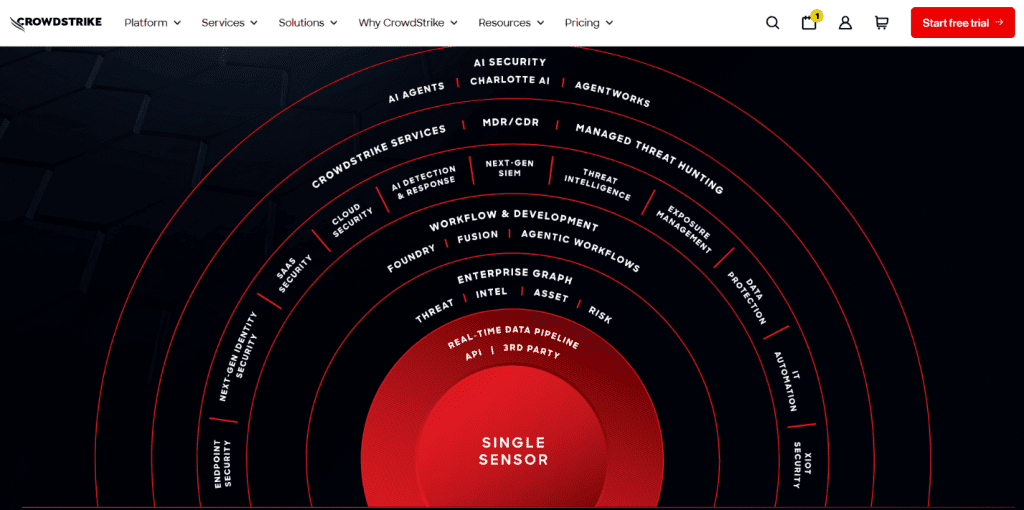
Figure 1 crowdstrike homepage
5. Have a cybersecurity policy.
Every firm should have a handful of straightforward security policies – nothing overly complex, just the basics that reduce the most significant risks. Start with an Acceptable Use & App Policy, which clearly states which tools are approved for business and bans the use of personal cloud storage for client data. If staff need remote access, provide managed laptops instead of allowing a mix of individual and work devices.
Next is a Password & MFA Policy. Require that all passwords be generated by a password manager and never reused. Multi-factor authentication (MFA) should be mandatory on every critical system. For high-risk administrator accounts, rotate passwords at least annually and reset them immediately if any potential exposure is suspected.
A solid backup and recovery policy is also essential. Follow the 3-2-1 rule: keep three copies of your data, on two different types of media, with at least one copy stored off-site or in an immutable format.
Conclusion
Security isn’t about perfection but about blocking cheap shots. Password managers, MFA, domain protection, patching, and basic policies stop most threats. Start with the essentials above, then iterate—your firm will be far ahead of the pack.
References:
The author is a business writer and project coordinator, Omeriye Foundation.